Multi-line, word-wrapped text input box. More...
#include <TextArea.h>
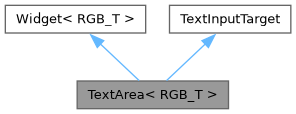
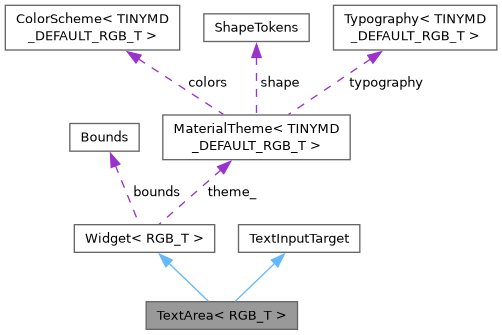
Public Member Functions | |
| TextArea ()=default | |
| TextArea (Bounds bounds, const char *label=nullptr, const char *placeholder=nullptr) | |
| const std::string & | text () const |
| void | setText (const char *text) |
| void | setMaxLength (size_t maxLength) |
| 0 (the default) means unlimited. | |
| bool | focused () const |
| void | focus () |
| void | blur () override |
| void | insertChar (char c) override |
| void | backspace () override |
| void | submit () |
| bool | handleEnter () override |
| TextInputTarget: closes the keyboard, same as TextField - see submit(). | |
| void | draw (tinygpu::ISurface< RGB_T > &target) override |
| bool | onGesture (const tinygpu::GestureEvent &event) override |
| Handles one gesture event. Returns true if this widget consumed it. | |
| bool | update (uint32_t nowMs) override |
 Public Member Functions inherited from Widget< RGB_T > | |
| virtual | ~Widget ()=default |
| virtual void | setTheme (const MaterialTheme< RGB_T > &theme) |
| virtual void | draw (tinygpu::ISurface< RGB_T > &target)=0 |
| virtual bool | onGesture (const tinygpu::GestureEvent &event) |
| Handles one gesture event. Returns true if this widget consumed it. | |
| virtual bool | update (uint32_t nowMs) |
| virtual bool | isDraggable () const |
| virtual bool | isDraggableAt (int32_t x, int32_t y) const |
| virtual int | childCount () const |
| virtual Widget< RGB_T > * | child (int index) |
| virtual void | drawBackground (tinygpu::ISurface< RGB_T > &target) |
| virtual void | setThemeTint (RGB_T background, RGB_T foreground) |
| virtual bool | isContainer () const |
| Provides true if the widget is a container. | |
| Public Member Functions inherited from TextInputTarget | |
| virtual | ~TextInputTarget ()=default |
| virtual InputType | inputType () const |
| The kind of input - Keyboard picks its layout from it. Default: text. | |
| virtual void | insertChar (char c)=0 |
| virtual void | backspace ()=0 |
| virtual void | blur ()=0 |
| virtual bool | handleEnter ()=0 |
Public Attributes | |
| std::function< void()> | onFocus |
| std::function< void(const std::string &)> | onChange |
| Fired after every character insertion/deletion. | |
| std::function< void()> | onSubmit |
| Fired when a Keyboard's Done key (or submit()) is pressed. | |
| Public Attributes inherited from Widget< RGB_T > | |
| Bounds | bounds |
| bool | visible = true |
| bool | enabled = true |
Additional Inherited Members | |
| Protected Member Functions inherited from Widget< RGB_T > | |
| const MaterialTheme< RGB_T > & | theme () const |
| Convenience accessor for draw() overrides - see theme_. | |
| Protected Attributes inherited from Widget< RGB_T > | |
| const MaterialTheme< RGB_T > * | theme_ = nullptr |
Detailed Description
class tinymd::TextArea< RGB_T >
Multi-line, word-wrapped text input box.
TextArea is TextField's multi-line counterpart - same focus/keyboard wiring, same TextInputTarget contract (see Core/TextInputTarget.h and TextField.h's class comment for the manage()/Keyboard pairing). Note that a Keyboard's dedicated Enter key (not Done) is what inserts a newline here - Done always finishes editing and closes the keyboard, exactly like TextField, via the same handleEnter()/submit() pair.
Wrapping reuses TinyGPU's existing LinePrinter (the same one Card and Dialog use for their body text) rather than reimplementing word wrap. The blinking end-of-text cursor uses LinePrinter::cursorX()/cursorY(), which report where the next character would land after a print() call.
Known limitation: no scrolling - text past the box's bottom edge is cropped to the box (see ISurface::pushClipRect()) rather than scrolling into view, and the cursor is skipped once it would fall past the box for the same reason. Fine for a few lines of notes; not a substitute for a real multi-page, scrollable text editor.
Constructor & Destructor Documentation
◆ TextArea() [1/2]
|
default |
◆ TextArea() [2/2]
Member Function Documentation
◆ backspace()
|
inlineoverridevirtual |
Implements TextInputTarget.
◆ blur()
|
inlineoverridevirtual |
Implements TextInputTarget.
◆ draw()
|
inlineoverridevirtual |
Renders the widget into target using colors/fonts/tokens from its own theme (see theme()/setTheme()).
Implements Widget< RGB_T >.
◆ focus()
|
inline |
◆ focused()
|
inline |
◆ handleEnter()
|
inlineoverridevirtual |
TextInputTarget: closes the keyboard, same as TextField - see submit().
Implements TextInputTarget.
◆ insertChar()
|
inlineoverridevirtual |
Implements TextInputTarget.
◆ onGesture()
|
inlineoverridevirtual |
Handles one gesture event. Returns true if this widget consumed it.
Reimplemented from Widget< RGB_T >.
◆ setMaxLength()
|
inline |
0 (the default) means unlimited.
◆ setText()
|
inline |
◆ submit()
|
inline |
Loses focus and fires onSubmit - called directly, or via a Keyboard's Done key through handleEnter(). Inserting a newline is the dedicated Enter key's job (Keyboard calls insertChar('
') for that directly, bypassing this), so - like TextField - Done always finishes editing.
◆ text()
|
inline |
◆ update()
|
inlineoverridevirtual |
Called once per frame, before draw(), to advance any time-based animation (ripple fade, indeterminate progress sweep, ...). Returns true if that advance changed anything this widget will draw differently, so Screen can decide whether a redraw is actually needed - see Screen::isDirty(). Default: no-op, not dirty, so widgets that don't animate cost nothing extra.
Reimplemented from Widget< RGB_T >.
Member Data Documentation
◆ onChange
| std::function<void(const std::string&)> onChange |
Fired after every character insertion/deletion.
◆ onFocus
| std::function<void()> onFocus |
◆ onSubmit
The documentation for this class was generated from the following file:
- src/TinyMaterialDesign/Widgets/TextArea.h