Mixing of multiple audio input streams into a single output stream. More...
#include <AudioOutput.h>
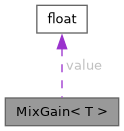
Public Member Functions | |
| MixGain ()=default | |
| MixGain (float f) | |
| T | scale (T sample) const |
Public Attributes | |
| float | value = 0 |
Detailed Description
struct audio_tools::MixGain< T >
Mixing of multiple audio input streams into a single output stream.
The OutputMixer allows you to combine multiple audio streams by summing their samples with configurable weights per channel. Each input stream is buffered independently using ring buffers, and the mixer outputs the combined result when all buffers have sufficient data available.
Features:
- Multiple input streams with individual weight control
- Automatic or manual stream indexing for simplified writing
- Configurable buffer sizes per stream
- Real-time mixing with sample-accurate synchronization
- Memory-efficient ring buffer implementation
Auto Index Functionality: By default, auto-indexing is enabled (setAutoIndex(true)). When using the basic write() method without specifying a stream index, the mixer automatically:
- Writes data to the current stream index (starting at 0)
- Increments to the next stream index after each write
- Automatically calls flushMixer() after writing to the last stream
- Resets the index back to 0 for the next cycle
This enables simple round-robin writing where you just call write() repeatedly and the mixer handles stream distribution and output flushing automatically.
Usage Examples:
Auto Index Mode (default):
Manual Index Mode:
- Note
- By default uses RingBuffer as the buffer type. Buffer type can be customized using setCreateBufferCallback().
- All input streams must have the same sample format (bit depth, sample rate).
- The mixer normalizes output by dividing by the total weight sum.
- In auto-index mode, ensure you write to all streams in each cycle for proper mixing.
- Copyright
- GPLv3
- Template Parameters
-
T Audio sample data type (e.g., int16_t, int32_t, float)
Applies a normalized [0,1] mixing gain to a full-range sample T, used by OutputMixer and InputMixer. The default (float) multiply works for any T, including T=float. Specialized for T=int16_t/int24_t/int32_t under PREFER_FIXEDPOINT to go through q1_14_t::scale() (integer-only) instead of a per-sample float multiply – the same technique used for VolumeStream's fixed-point volume path.
Constructor & Destructor Documentation
◆ MixGain() [1/2]
|
default |
◆ MixGain() [2/2]
Member Function Documentation
◆ scale()
|
inline |
Member Data Documentation
◆ value
| float value = 0 |
The documentation for this struct was generated from the following file:
- src/AudioTools/CoreAudio/AudioOutput.h