TinyMaterialDesign
Loading...
Searching...
No Matches
Public Member Functions | Public Attributes | List of all members
SegmentedButton< RGB_T > Class Template Reference

Connected row of segments sharing one pill-shaped outline (M3 "segmented button"). Single-select (radio-like, the default) or multi-select (checkbox-like, toggling independently) - see setMultiSelect(). More...

#include <SegmentedButton.h>

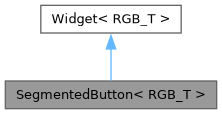
Inheritance diagram for SegmentedButton< RGB_T >:
Inheritance graph
[legend]
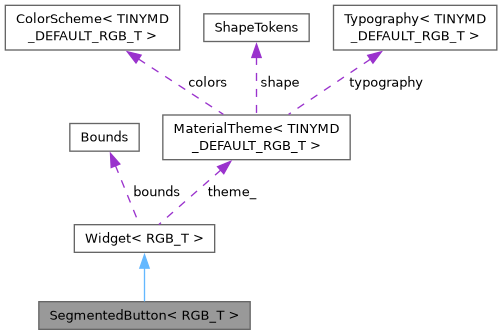
Collaboration diagram for SegmentedButton< RGB_T >:
Collaboration graph
[legend]

Public Member Functions

 SegmentedButton ()=default
 
 SegmentedButton (Bounds bounds)
 
void addSegment (const char *label)
 
void setMultiSelect (bool multiSelect)
 
bool isSelected (int index) const
 
void setSelected (int index, bool selected)
 
void draw (tinygpu::ISurface< RGB_T > &target) override
 
bool onGesture (const tinygpu::GestureEvent &event) override
 Handles one gesture event. Returns true if this widget consumed it.
 
- Public Member Functions inherited from Widget< RGB_T >

virtual ~Widget ()=default
 
virtual void setTheme (const MaterialTheme< RGB_T > &theme)
 
virtual void draw (tinygpu::ISurface< RGB_T > &target)=0
 
virtual bool onGesture (const tinygpu::GestureEvent &event)
 Handles one gesture event. Returns true if this widget consumed it.
 
virtual bool update (uint32_t nowMs)
 
virtual bool isDraggable () const
 
virtual bool isDraggableAt (int32_t x, int32_t y) const
 
virtual int childCount () const
 
virtual Widget< RGB_T > * child (int index)
 
virtual void drawBackground (tinygpu::ISurface< RGB_T > &target)
 
virtual void setThemeTint (RGB_T background, RGB_T foreground)
 
virtual bool isContainer () const
 Provides true if the widget is a container.
 

Public Attributes

std::function< void(uint32_t)> onChange
 
- Public Attributes inherited from Widget< RGB_T >
Bounds bounds
 
bool visible = true
 
bool enabled = true
 

Additional Inherited Members

- Protected Member Functions inherited from Widget< RGB_T >
const MaterialTheme< RGB_T > & theme () const
 Convenience accessor for draw() overrides - see theme_.
 
- Protected Attributes inherited from Widget< RGB_T >
const MaterialTheme< RGB_T > * theme_ = nullptr
 

Detailed Description

template<typename RGB_T = TINYMD_DEFAULT_RGB_T>
class tinymd::SegmentedButton< RGB_T >

Connected row of segments sharing one pill-shaped outline (M3 "segmented button"). Single-select (radio-like, the default) or multi-select (checkbox-like, toggling independently) - see setMultiSelect().

Constructor & Destructor Documentation

◆ SegmentedButton() [1/2]

SegmentedButton ( )
default

◆ SegmentedButton() [2/2]

SegmentedButton ( Bounds  bounds)
inlineexplicit

Member Function Documentation

◆ addSegment()

void addSegment ( const char *  label)
inline

◆ draw()

void draw ( tinygpu::ISurface< RGB_T > &  target)
inlineoverridevirtual

Renders the widget into target using colors/fonts/tokens from its own theme (see theme()/setTheme()).

Implements Widget< RGB_T >.

◆ isSelected()

bool isSelected ( int  index) const
inline

◆ onGesture()

bool onGesture ( const tinygpu::GestureEvent &  event)
inlineoverridevirtual

Handles one gesture event. Returns true if this widget consumed it.

Reimplemented from Widget< RGB_T >.

◆ setMultiSelect()

void setMultiSelect ( bool  multiSelect)
inline

◆ setSelected()

void setSelected ( int  index,
bool  selected 
)
inline

Member Data Documentation

◆ onChange

std::function<void(uint32_t)> onChange

Fired whenever selection changes, with a bitmask of selected segments (bit i set == segment i selected) - a single-select bar always has exactly one bit set. Limits a bar to at most 32 segments (the bitmask's width), well beyond what's usable as an actual row of segments.


The documentation for this class was generated from the following file: